
Our system can accommodate up to four videos, ten photos, three pieces of audio, and/or multiple downloadable files per piece of content.
Allowable file types are as follows:- Video: mp4
- Image: png, gif, jpg, jpeg
- Audio: mp3, wav, ogg
- Downloadable Attachments: txt, doc, docx, csv, pdf, xls, xlsx, kmz
The maximum file sizes are listed below:
- Video: 100 MB per file. We recommend uploading shorter videos for distribution across our network. If your video exceeds 30 minutes, please reach out to your Client Success Manager.
- Image: 5MB per file. Images larger than 1280x20000 pixels will be resized.
- The first image in the section pictured below must be in a 3:2 or 16:9 ratio to ensure it does not get cropped on distribution sites. If your leading image doesn't fit one of these ratios, we’ll adjust it and share it for your review and approval before publishing.
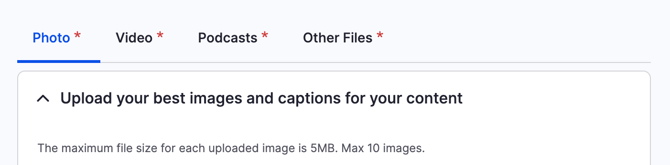
- Audio: 100MB per file
- Attached downloadable files: 50MB per file
Multimedia Content Guidelines for Web Accessibility:
- Informative images: Images that graphically represent concepts and information, typically pictures, photos, and illustrations. The text alternative should be at least a short description conveying the essential information presented by the image.
- Images of text: Readable text is sometimes presented within an image. If the image is not a logo, avoid text in images. However, if images of text are used, the text alternative should contain the same words as in the image.
- Complex images such as graphs and diagrams: To convey data or detailed information, provide a complete text equivalent of the data or information provided in the image as the text alternative.
- Groups of images: If multiple images convey a single piece of information, the text alternative for one image should convey the information for the entire group.
Excerpted from: Images Tutorial (Web Accessibility Initiative)
Image filenames
The filenames of images help visitors using screen readers (when the alternative text attribute isn’t included), and search engines understand your visual content.
For the image, an example of an unoptimized image file name would be “https://www.site.com/images/654.png”.

For the same image, an improved file name would provide context for what the image is; the file name could be “https://www.site.com/images/blue-faced-dog.png”.
Image alternative text
The alternative text attribute of the image element is meant to describe the image when visual consumption isn’t an option. This is useful for users of screen readers and search engine crawlers to understand images.

Image file names are read for images without alt text. As an example, consider the experience of this image.
Without alt text:
<img src=”https://www.site.com/images/23411026789787.png”>
A screen reader would read the image file name followed by ‘image’. In this case, the visitor would hear “/23411026789787.png, image”. Long and non-descriptive image file names don’t provide context to the visitor and provide a poor experience.
With alt text:
<img src=”https://www.site.com/images/23411026789787.png” alt=”Black and Grey Dog Smiling in a Grassy Yard”>
A screen reader would read the image alternative text followed by ‘image’. This provides a much better experience.
Alt text best practices
-
Describe the image within the context of the page
-
Exclude ‘image of’, ‘picture of’, ‘thumbnail of’
-
Screen readers already say ’image’ and search engine crawlers understand it is an image because of the image element.
-
-
Use empty alt attribute for decorative images (purely visual purpose and adds no value to the content of the page).
-
When possible, decorative images should be provided via CSS
-
Example: <img src=”https://www.site.com/images/654.png” alt=””>
-
-
Limit the character count to 125