
New to the tracker? See how it measures visibility in AI Visibility Tracker: Methodology & Metric Reference, and every reputation pillar, topic, and audience in AI Visibility Tracker Definitions.
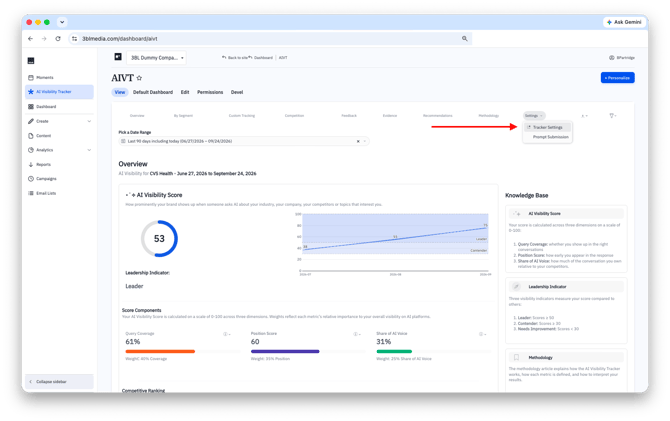
Open your settings
Here's how it works:
- If you manage more than one account, check that the right one is selected in the account switcher at the top of the page.
- Click AI Visibility Tracker in the left sidebar to navigate to the dashboard.
- Select the tracker settings from the dropdown. Your settings form opens.
Choose your topics
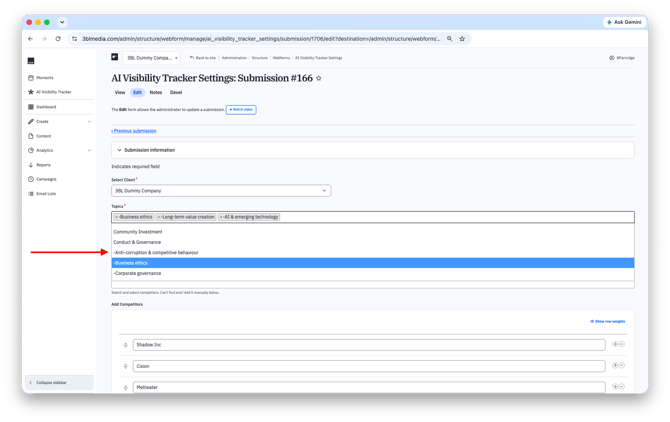
Topics tell the tracker which prompts, variables, and pillars to measure. Each topic automatically falls under one of seven reputation pillars.
Here's how it works:
- Click into the Topics field to open the list.
- Select up to 4 topics.
- To remove a topic, click the × on its tag.
FAQ
Which topics should I pick? Pick the areas where you most want to be known, or where your stakeholders are asking questions. See what each topic covers in AI Visibility Tracker Definitions, or ask your client success manager for help choosing.
Can I select a whole pillar? No. Each reputation pillar may contain more than the maximum choices allowed. Additionally, the tracker is meant to measure visibility and reputation across many topics and aspects of your organization.
Choose your audiences
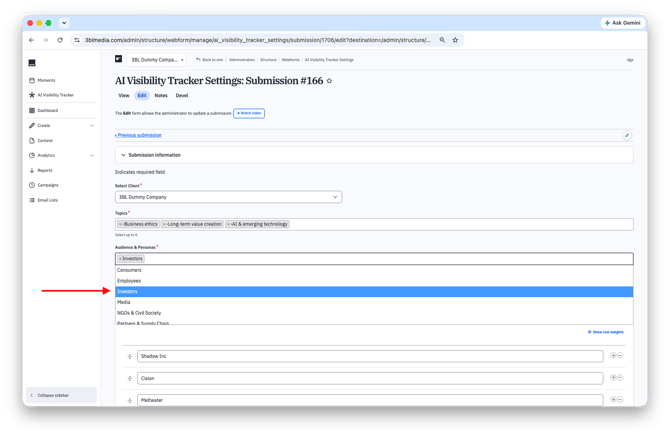
Audiences tell the tracker which stakeholder groups matter most to you. See who each audience includes in AI Visibility Tracker Definitions.
Here's how it works:
- Click into the Audience & Personas field.
- Select up to 2 audiences: Consumers, Investors, Talent, NGOs, Media, Regulators or Partners.
- To remove an audience, click the × on its tag.
Add competitors
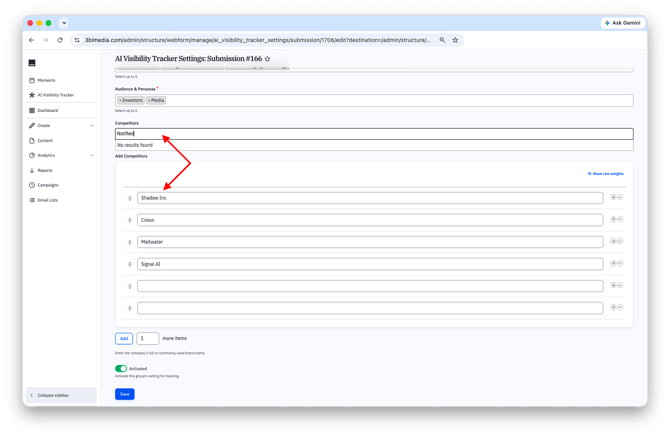
Competitors are the companies you're benchmarked against.
Here's how it works:
-
Competitors: Search for a company and select it from the list.
-
Add Competitors: Can't find a company in search? Enter its full or commonly used brand name here, one per row.
-
Add more items: Enter a number and click Add to create more blank rows.
-
Reorder or remove: Drag the handle on the left of a row to reorder it, or click − to remove it.
FAQ
Can I list the same competitor twice? No. Check the list for duplicates before saving; each competitor should appear once.
Should I use the legal name or the brand name? Use the name people actually use, e.g. "Meltwater," not the full legal entity name.
Save your changes
Activated: Keep this toggle on so the tracker runs with these settings. Turn it off to stop tracking with them.
Click Save. Your new settings apply from the next tracker run.
FAQ
Will changing topics affect past results? No. Past results stay as they were. New topics are tracked from the next run forward